cmart's AI Slop Machine
ai computers project
I, a human, write every word of this blog in my own voice. Nonetheless, I built an AI Slop Machine.
Background
(Boring! Skip to the pretty chart)
American and Chinese AI labs continue to make increasingly strong open-weights large language models (Qwen, Gemma, gpt-oss, and others). You can self-host these LLMs on consumer-attainable computers and GPUs. They’re pretty good at agentic knowledge work tasks, and when you use them, several of the things that people say are bad about AI don’t apply.
- A tech company never handles your prompt or response data. It stays on your own computer.
- You aren’t stuck on a ride of subscription-with-mystery-quota versus premium API pricing. Once you buy the hardware, it’s free to download the models and use them forever.
- The ways that you access self-hosted LLMs are generally free of advertising or manipulation of your attention.
- Once you have a copy of the model, its maker cannot withdraw your access to it.
- You aren’t causing additional demand for AI data centers.
- Yes, these models are trained at large computational expense, but the cake is done baking by the time you download a copy.
- The electricity you’ll use is at most a few hundred watts while it’s actively working, similar to a video game console.
So, I’ve watched my friends with higher-spec Macbooks running increasingly-capable AI at usable speeds, bringing chunky power bricks to the cafe and using agents on hot, whirring laptops.
Meanwhile, my daily laptop (a 13th-gen Intel Framework 13) is not good at this. As a party trick, it fits decent LLMs in its 48 GB of system RAM, but the ~50 GB/s combined bandwidth of two DDR4 memory modules is a severe bottleneck. With an empty context window, I get single-digits of tokens per second from mixture-of-experts models (like Gemma 4 26B-A4B or Qwen 3.6 35B-A3B), and it slows down sharply as the context window grows. If I try a stronger dense model (like Qwen 3.6 27B or Gemma 4 31B), I measure throughput in seconds per token, unusably slow for interactive work. So, after leaving a job at which I deployed LLMs on a $15m pile of hardware, I’ve been using AI services hosted by companies for day-to-day tasks, mostly via Kagi Assistant and OpenRouter.
Also meanwhile, AI labs and neoclouds are supply-squeezing the RAM and GPU markets, making LLM-capable computers (nay, all computers) more expensive. This may not be an intentional strategy to make people more dependent on Codex and Claude subscriptions, but the economics sure point in that direction. If the AI bubble doesn’t pop then the shortage will continue raising hardware prices for years. So, if I wanted to do productive things with strong LLMs on my own computer, it was time to buy more computer.
LLM Selection
Given the pace of LLM evolution and obsolescence, it seems stupid to buy hardware sized to run one specific model, but I sorta did. Qwen 3.6 27B came out in April. It’s a Chinese model, with all the quirks and biases that entails. But if you believe LiveBench, Qwen 3.6 27B performs better than much larger models across several categories of task. Better than DeepSeek V3.2! To find an unambiguously more capable open-weights model on this benchmark, you need to reach for DeepSeek V4 Flash, which requires 10 times more VRAM (holding weight precision constant), and its overall score is only a little better. Other unpolluted, private benchmarks also show good things for this model. Also, I think it’s fair to say that the /r/localllama community really likes working with Qwen 3.6 27B. It behaves well in an agent harness, and malformed tool calls are rare in my experience.
Being a dense model, Qwen 3.6 27B is computationally intensive to run compared to mixture-of-experts models of similar overall size. But dense models get you the most ‘intelligence’ for a given amount of VRAM, and VRAM is the most limited aspect of ‘affordable’ GPU hardware these days. This model tolerates quantization down to ~4 bits per weight quite well, which makes it even more VRAM-friendly.
I already had good experiences harnessing cloud-hosted versions of this model. But if I want an alternative, Gemma 4 31B from Google is almost as good on benchmarks, and Google fixed the obnoxious corporate training manual personality that plagued Gemma 3.
I usually prefer slower-smarter tokens over faster-stupider tokens, because progress is often limited by me reading and understanding what the agent is doing, and ‘more code’ is often a liability. But if you want a faster model at similar size, you can use Qwen 3.6 35B-A3B or Gemma 4 26B-A4B, both sparse mixture-of-experts which accept an ‘intelligence’ penalty to use less computation per token.
So, any computer that will fit Qwen 3.6 27B will also fit good alternatives, with diversity of American + Chinese origin and sparse + dense architecture. And looking to the future, these are the worst models that we’ll ever be able to run at this size tier. If AI labs keep releasing better open-weights models (as they have for the past few years), the same computer will be able to run better LLMs as time goes on.
Hardware Selection
I hear you saying “just get a Mac”. I was prepared to! My shopping list was:
- Enough VRAM to fit
useful models without aggressive quantization blah blahQwen 3.6 27B at ~4 bpw, MTP, vision support, deep-ish context window.- The highest-quality 4-bit GGUF (UD-Q4_K_XL) is 17.9 GB, so 24 GB of VRAM isn’t really enough but 32 GB probably is.
- Enough memory bandwidth to generate text at comfy reading speed (20-30+ tokens per second).
- Enough compute for fast context prefill
- Especially important for agentic programming. Agents do a lot of reading.
- Single computer or GPU, to avoid a mess of tradeoffs and spotty backend support for splitting model weights (tensor or pipline parallelism) across a PCIe or network link.
- (RTX 3090 has faster NVLink but it’s discontinued.)
- Reasonably mature ecosystem support for LLMs, i.e. there is already software that uses the hardware fully and efficiently to run the models that you want.
Right now, the market looks like this.
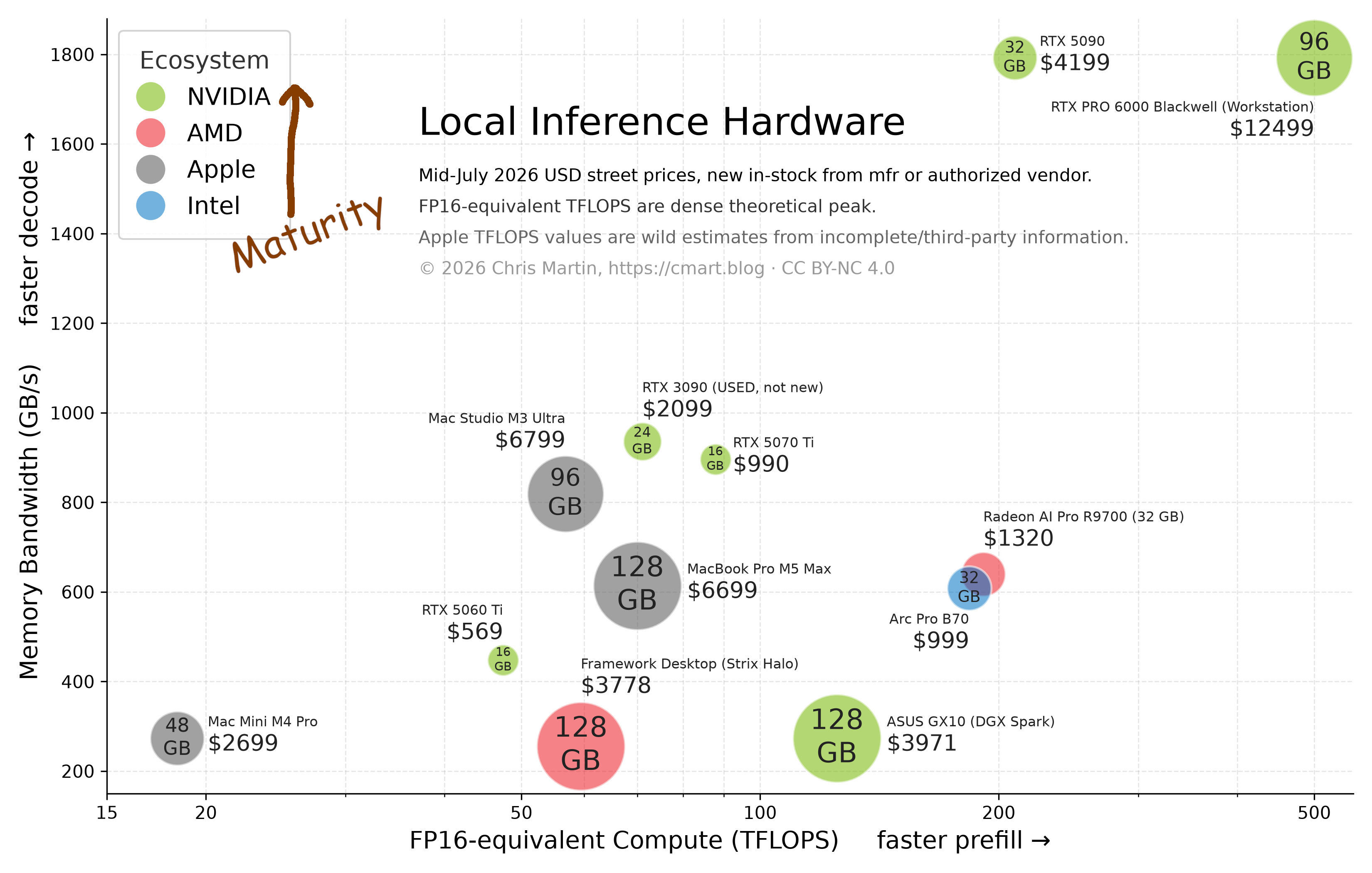
(Here is the code and data if you want to modify this chart. And yes, I made the chart with the slop machine.)
At time of writing, everything on the chart (except RTX 3090) is actually in-stock at a non-sketchy seller, for the prices indicated, to buy new with a warranty. (So there’s no discontinued 128+ GB Mac Studio or 64 GB Mac Mini.) Also, you can use all of this stuff in your house without obnoxious noise levels, 240 volt circuits, or needing to attach a separate fan + shroud. (So there’s no old datacenter GPUs like MI50 or V100.)
My takeaways from the chart:
- High-spec Macs have a lot of VRAM and good memory bandwidth, but are weak on compute compared to the latest prosumer GPUs. (Note the logarithmic X-axis!) Agentic workloads do a lot of reading stuff, i.e. prefill, which is compute-bound while you wait for a response to start streaming. This tells me to only get a Mac if I need all that VRAM, which I don’t if my daily model is ~27B parameters.
- DGX Spark is a much better value than Strix Halo at current prices! But even so, it’s very bandwidth-constrained compared to prosumer GPUs and Macs, so if you don’t need all that VRAM, skip it.
- For $4k, NVIDIA will sell you either a lot of VRAM or a lot of memory bandwidth, but to get both you need to spend $12,500.
But I didn’t have this chart when I decided! My decision process was: buy the cheapest new 32 GB+ GPU that has reasonably good support in llama.cpp and vLLM. This was almost an Intel Arc Pro B70, but AMD’s maturer software ecosystem tipped me to a Radeon AI Pro R9700. I paid $1349 on June 6 for the ASRock version. And lo, my AI Slop Machine.
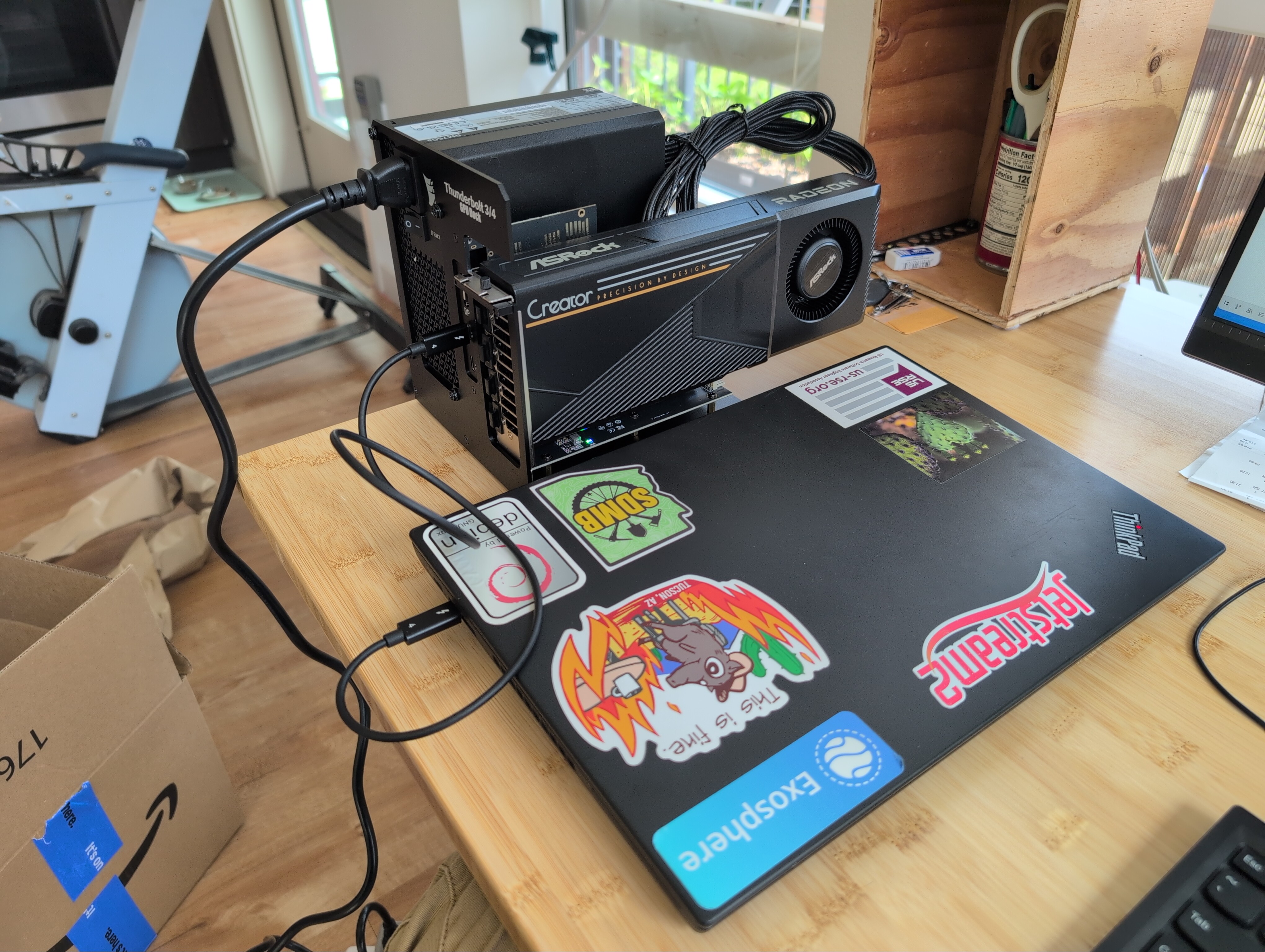
Yes, that’s an external GPU dock. I don’t have a desktop computer but I do have a spare old Thinkpad, and it was much cheaper to buy an eGPU dock for the T480 than to build a new desktop in these RAM-constrained times. The T480’s Thunderbolt 3 port only supports two lanes of PCIe 3.0. This was slow even by 2018 standards, but I don’t expect it to affect overall performance much. It takes an extra moment to load the model weights across the Thunderbolt link, but after it’s started up, all the bandwidth-intensive stuff stays local to the GPU. You’re passing prompt and response tokens over Thunderbolt, but that’s tiny data. If you allow your inference software to swap out prompt caches to system RAM, then if your agents are alternating between multiple loong prompts, those several-GB transfers each take a few seconds, but you’re still getting a big speedup compared to prefilling with an empty prompt cache.
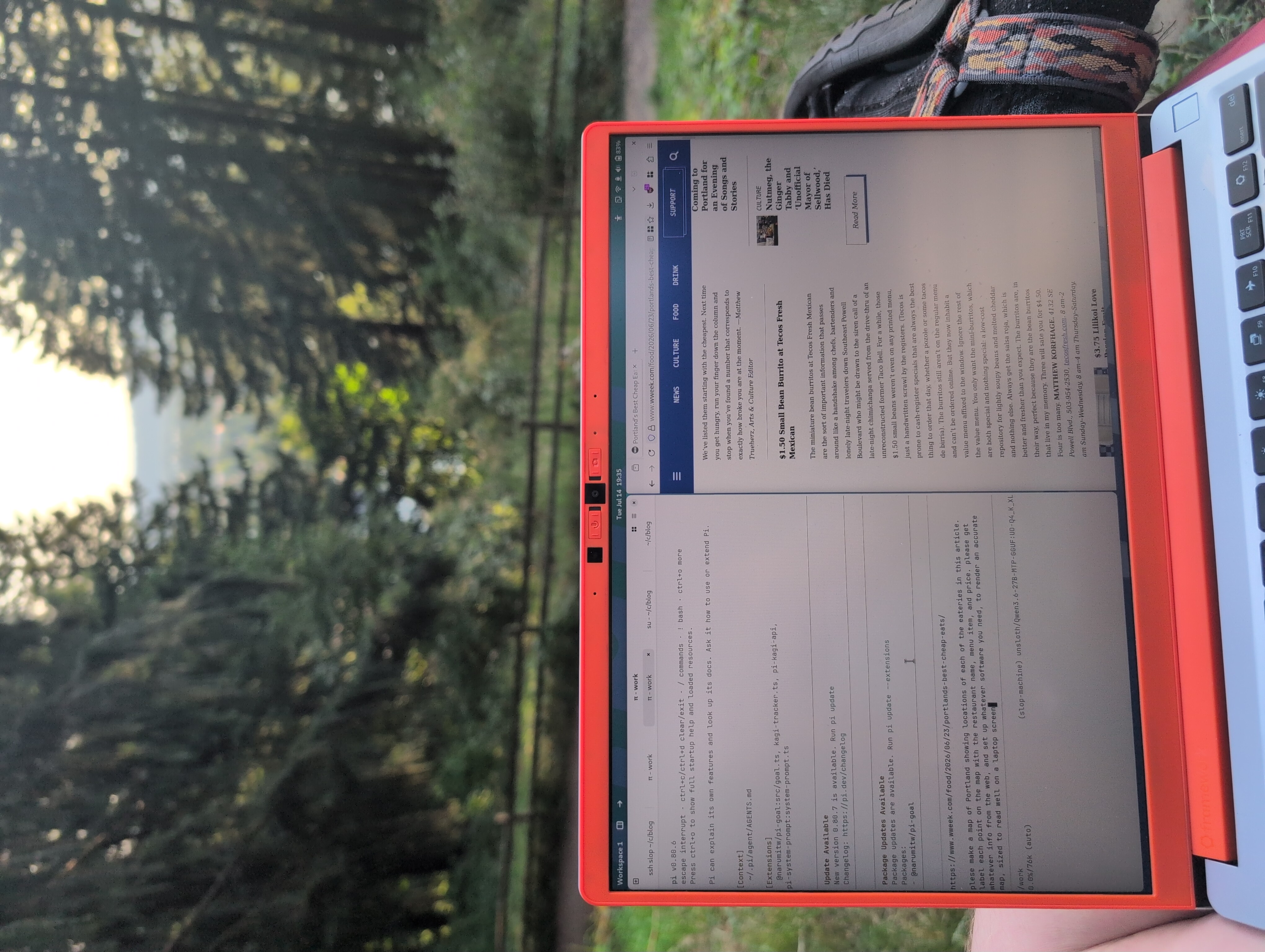
Yes, this is not portable. The loaded dock and laptop weigh a combined ~20 pounds. But that’s fine, because I set it up as a server. I’m making API calls to it over an SSH tunnel from a different laptop, on the couch, cafe down the street, hotspot from my phone, etc. There are several ways to get secure remote network access to a computer like this, with varying levels of ease and robustness. One benefit of running your LLM on a separate server is that the laptop under your hands stays cool, quiet, and long-lasting on battery. The drawback, of course, is you need a reliable internet connection at both ends. It doesn’t need to be a fast connection, as you’re only passing text and the occasional image back and forth.
My agent harness sees the slop machine as an OpenAI-compatible API, just like you get from any other inference provider. The location, shape, and size of the physical server are totally abstracted away from the client.
Anyway, this works mostly great. Within a couple hours of opening the box, I had it running Qwen 3.6 27B via llama.cpp at speeds reflecting full GPU usage.
Configuration and Tuning
Given a GPU+LLM combination, the possibility space of how you run it is surprisingly large.
- There are several choices of inference engine (the computer program that loads the LLM and manages the work on the GPU), with tradeoffs. For example, llama.cpp runs faster for a single request at a time, while vLLM accepts slower per-request generation in exchange for handling many parallel requests at much higher combined generation speed.
- These programs have many config knobs to push performance in one direction or another, to fit your hardware or workload better. One recent example, you can enable multi-token prediction to get 50+% faster generation speed, at the cost of incrementally slower prefill and a little less VRAM available for the context window.
- For some hardware, you get a choice of multiple GPU backends. ROCm or Vulkan? I dunno, try both and see which works better.
- The less-popular combinations of GPU+LLM have various bugs and performance degradations. vLLM is especially finicky to get working on new or niche hardware/models. You end up collecting fixes to apply from various bug reports and pull requests, or maybe find someone else’s fork with the necessary set of patches baked in.
I wanted to explore this space somewhat systematically, and use my agent to do most of the work, which turned out to be learningful and a lot of fun. I made all of this happen in slop-machine, a git workspace where I ‘collaborate’ with Pi coding agent. We discuss research questions and things to try, and put them in TODO.md. The agent works on todos and puts its findings in lab-notebook.md, where I review what it found and guide the follow-up work. Sometimes I’ll also write in the lab notebook, and each section indicates who authored it. These files help future agent sessions understand what’s going on quickly. They can read it all into the context window and pick up whatever task is next.
The agent’s personality is Adderall XR, which is good and bad. It has unlimited stamina to keep trying stuff, browse the web for solutions to problems, write debugging scripts, set up another parameter sweep or ablation while I go do something else. It’s also susceptible to hyperfocus on details that don’t matter, fail to notice some obvious mistakes, and have poor epistemic awareness (what others call “hallucination”). So, I help it stay on track. I think we complement each others’ strengths well, and its rate of mistakes is well below the threshold of “too much to be useful”. It does kinda feel like a research collaboration!
The agent runs in a Podman container sandbox on my ‘regular’ laptop, but I gave it root SSH access to the slop machine to try anything it wants to. It also maintains the ‘production’ inference configuration that the slop machine runs when we aren’t trying something different. At some point I’ll rebuild the slop machine’s operating system, replacing junk on the filesystem with a clean configuration, and maybe revoke the agent’s root access. But for now, it’s not a problem.
Yes, my agent cannot use the slop machine’s LLM while also restarting or tinkering with its underlying inference engine. To deconflict this, I switch it to using a hosted LLM API from OpenRouter.
Current Performance Envelope
- llama.cpp for general-purpose or interactive agent use.
- It prefills at 815-ish TPS with empty context window, decreasing to about half that with a full (100+k) context.
- It generates at high-20s-to-low-30s TPS, and this decreases only slightly as the context window fills.
- Without vision capability, I am fitting somewhere between 93,000 and 131,072 tokens in context, or with vision, between 76,000 and 85,000.
- This means agentic tasks that don’t need vision get to use more in-context learning and have less-frequent compactions.
- This is conservative because I’m currently using 16-bit activations, while many folks online are using 8-bit or fewer, which would fit a much bigger context window.
- vLLM only for at least 3 parallel requests.
- It prefills at ~640 TPS regardless of request concurrency?
- It generates at ~8 TPS per reqest, dropping somewhat (but gaining aggregate throughput) as we double to 2, 4, 8, and 16 concurrent requests.
- Here I did notice much better performance when I connected my newer (Thunderbolt 4) laptop to the eGPU. With 16 parallel requests, the TB4 laptop gets 126.4 aggregate TPS, compared to 60.6 with the T480. So, maybe this is bottlenecking on slow CPU or the slow TB3 link, somehow.
- I have not explored vLLM performance as much because it’s more bleeding-edge, buggy, and a less-common use case for me so far. Haven’t tried MTP or vision. That said, Donato Capitella’s fork of VLLM does work, and I hope/expect performance with 4-bit AWQ quantization to improve in the future.
Here is an inference card for the current ‘production’ llama.cpp config (sans vision).
+----------------Inference Card v1-----------------+
| Who+when: Pi agent, 2026-07-12                   |
| Weights repo: hf.co/unsloth/Qwen3.6-27B-MTP-GGUF |
| Quantization: UD-Q4_K_XL                         |
| Platform: Thinkpad T480, Debian 13, TB3 eGPU     |
| Accelerator+mem: AMD Radeon AI Pro R9700, 32 GB  |
| Engine+ver: llama.cpp b9948 (prebuilt ROCm 7.2)  |
| GPU runtime+ver: ROCm 7.2.4                      |
|----------------------Tok/s-----------------------|
| Concurrency  |           Context depth           |
|  ↓ | Stage   |  Empty |   4096 |  16384 |  65536 |
|----|---------|--------|--------|--------|--------|
|  1 | prefill |  507.2 |  813.6 |  806.6 |  602.2 |
|  1 | decode  |   33.0 |   31.2 |   28.5 |   29.3 |
+------------------Config / Notes------------------+

Serving with:

  GPU_MAX_HW_QUEUES=1 \
  /root/llama-b9948-rocm/llama-b9948/llama-server \
    -m .../Qwen3.6-27B-UD-Q4_K_XL.gguf \
    --gpu-layers all --host 0.0.0.0 --port 8080 \
    --ctx-size 131072 \
    --spec-type draft-mtp --spec-draft-n-max 4 \
    --chat-template-file .../chat_template.jinja \
    --flash-attn 1 --batch-size 2048 --ubatch-size 2048 \
    --cont-batching

GPU tuning: -75mV undervolt, 315W power cap.
GPU_MAX_HW_QUEUES=1 for idle power fix (84W → 19W).
+----------------End Config / Notes----------------+
Conclusion
This is not a finished project. It’s wild how quickly the inference engines improve, and already in the past month, two llama.cpp upgrades got me one-third faster prefill at 64k context depth and 16-30% faster decode. Sometimes performance will regress a little, but overall it marches upward.
Still, it now feels ‘sorted’ enough to shift my focus from tuning the machine to building other projects with the machine. I’ve been collecting goofy ideas for years, and there’s never been a better time to turn ideas into software.
Appendix: eGPU Reliability
The eGPU dock has been mostly fine for the month I’ve been using it. It is supposed to charge the connected laptop via the Thunderbolt cable. That works except for the two times that it stopped working, the laptop battery drained, and it shut off. So, I connected a second power supply to the laptop’s other USB-C port, hoping that’ll keep it charged if the dock fails to send power. I’ve had a couple of system crashes as well, but that was while compiling and trying different vLLM / llama.cpp versions. I have no idea whether the eGPU contributed to those.
To the surprise of some Linux friends, eGPU hotplug does work. Unplug it, GPU disappears from lspci. Plug it in and it shows up again.
Appendix: Some Agent Tricks
If you want Pi coding agent to see pictures with a vision model, You gotta tell Pi that the model accepts images. (Otherwise it will never try.)
      "models": [
        { "id": "unsloth/Qwen3.6-27B-MTP-GGUF:UD-Q4_K_XL",
          "input": ["text", "image"]
        }
      ]
If you’re leaving your agent to work in a /goal loop, you can give it a deadline! E.g.:
Please note the system time when you start work, and check the time regularly. I will return in 9 hours. Pay attention to how you’re using this time budget. Your goal is to have a usable prototype by the time I get back. If you find yourself hyperfocusing on a small detail, step back and take the broader view before proceeding again.
It sorta helps the agent use its time more effectively.
Appendix: OpenRouter Data Privacy Warning
(This warning surely applies more broadly than OpenRouter. Also, I can hear you say “duh, of course they do this”.)
While performance-tuning the slop machine, I had to run my agent with an LLM hosted elsewhere, so that it could still work while iteratively breaking and fixing the self-hosted server. It seemed convenient to feed some coins into OpenRouter and consume their served DeepSeek V4 Pro – a much larger (and stronger) model than I can run locally, and with inexpensive API prices compared to recent proprietary models. I noticed OpenRouter was routing my requests to a provider called StreamLake. StreamLake’s terms of service explicitly allow them to retain users’ prompt and response data for future model training purposes, sell it to other parties, and so forth. So, by default, OpenRouter will send your API requests to providers that do whatever the fuck they please with your data.
I don’t want other parties to retain, without loss of generality, sensitive credentials that may end up in my prompts. So, I learned I could edit my OpenRouter privacy settings to limit requests to only “Zero Data Retention” providers. When I did this, it started routing my requests to AtlasCloud, a seemingly US-based provider. Their per-token prices are more than double StreamLake’s for the same model. Yet still, AtlasCloud’s privacy policy does not explicitly say that they don’t share your data with other parties. If you’re hoping for a legally-enforceable chain of assurance through OpenRouter to AtlasCloud, they do not give you that, or anything even close to it. So, it’s murky, and now I’m paying >2x more for DeepSeek tokens.